

January 11, 2008

Fast Hands
Possibly the best hammer dulcimer player in the world! Skip to halfway through this clip to see his awesome skills!
January 10, 2008


Tyrrhenian Sea and Solstice Sky

Today the Solstice occurs at 0608 Universal Time, the Sun reaching its southernmost declination in planet Earth's sky. Of course, the December Solstice marks the beginning of winter in the northern hemisphere and summer in the south. When viewed from northern latitudes, the Sun will make its lowest arc through the sky along the southern horizon. So in the north, the Solstice day has the shortest length of time between sunrise and sunset and fewest hours of daylight. This striking composite image follows the Sun's path through the December Solstice day of 2005 in a beautiful blue sky, looking down the Tyrrhenian Sea coast from Santa Severa toward Fiumicino, Italy. The view covers about 115 degrees in 43 separate, well-planned exposures from sunrise to sunset.
Courtesy of Astronomy Picture of the Day
January 09, 2008
The Blog of Derek Jessome!
Visit this site every day cause he's going to upload a lot of crazy stuff in the coming weeks, he's a master story artists and character designer. With a very long list of credit to his name, he designed and storyboarded most of the MSTRKRFT video, plus a thousand other cartoons, so check out his stuff.

Saturn's Ancient Rings

How old are Saturn's rings? No one is quite sure. One possibility is that the rings formed relatively recently in our Solar System's history, perhaps only about 100 million years ago when a moon-sized object broke up near Saturn. Evidence for a young ring age includes a basic stability analysis for rings, and the fact that the rings are so bright and relatively unaffected by numerous small dark meteor impacts. New evidence, however, raises the possibility that some of Saturn's rings may be billions of years old and so almost as old as Saturn itself. Inspection of images by the Saturn-orbiting Cassini spacecraft indicates that some of Saturn's ring particles temporarily bunch and collide, effectively recycling ring particles by bringing fresh bright ices to the surface. Seen here, Saturn's rings were imaged in their true colors by the robotic Cassini in late October. Icy bright Tethys, a moon of Saturn likely brightened by a sandblasting rain of ice from sister moon Enceladus, is visible in front of the darker rings.
Courtesy of Astronomy Picture of the Day
Reflections on the 1970s

The 1970s are sometimes ignored by astronomers. In particular, this beautiful grouping of reflection nebulae in Orion - NGC 1977, NGC 1975, and NGC 1973 - are usually overlooked in favor of the substantial glow from the nearby stellar nursery better known as the Orion Nebula. Found along Orion's sword just north of the bright Orion Nebula complex, these reflection nebulae are also associated with Orion's giant molecular cloud about 1,500 light-years away, but are dominated by the characteristic blue color of interstellar dust reflecting light from hot young stars. North is down in this sharp color telescopic image from New South Wales, Australia, so the more familiar Orion Nebula borders the top of the view. NGC 1977 stretches across the field just above center, separated from NGC 1973 (below left) and NGC 1975 (below right) by darker regions of obscuring dust. Many northern hemisphere observers claim to see the general shape of a running man in the cosmic dust cloud but, of course, they're looking at the view upside down.
Courtesy of Astronomy Picture of the Day
January 08, 2008
January 06, 2008
Britney Spears Out of Hospital!!!
 Back home, Britney Spears spent the early part of Saturday with dad Jamie after being released from Cedars-Sinai hospital, PEOPLE has confirmed.
Spears's mom Lynne, who yesterday called for prayers for the embattled singer, remains in their hometown of Kentwood, LA.
Spears left the Los Angeles medical facility Saturday via an underground tunnel and was accompanied by TV therapist Dr. Phil, according to etonline.com, who first reported the news.
A Cedars-Sinai spokesperson declined to comment, but Dr. Phil released a statement to ET saying: "My meeting with Britney and some family members this morning in her room at Cedars leaves me convinced more than ever that she is in dire need of both medical and psychological intervention.
"She was released moments before my arrival and was packing when I entered the room. We visited for about an hour before I walked with her to her car."
Spears had been committed early Friday morning under California's "5150 Hold," in which Spears was deemed a danger to herself and could be held for 72 hours. Patients however can be released early if doctors determine they are no longer a threat to themselves.
"The 5150 legality is very loose," says Dr. Nathan Kuemmerle, a West Hollywood psychiatrist. "The 72 hours are not firm. All it requires is an ER psychiatrist to release the patient. ... If Britney isn't suicidal or homicidal, she doesn't need to be hospitalized."
January 05, 2008
Horizon to Horizon
 Click on image to see much larger version.
Smooth Skin
This simple little Photoshop tutorial will show you how to edit people's faces to smooth out their skins, just like how models are edited in magazines.

To start off, lets open up the picture you want to edit. I'm working from an Angelina Jolie photo of course.
First, we need to duplicate the layer, so lets go ahead and right click on the layer in the layers palette and select "Duplicate Layer".
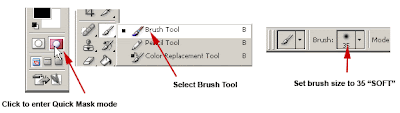
Now we need to select the area we want to smooth out, in this case, we want to smooth out the face, but we want to leave the eyes, nose and mouth intact so it looks genuine. So start by switching to the quick mask mode by clicking on the "Edit in Quick Mask Mode" button in the tool box.
Then select the Brush Tool, and set the brush size to 35 soft edge. (brush size will depend on your image).
Press "D" to reset your colors. Now use your brush and paint over the face, the painted area will become your selected area. The painted area will be red as you can see below. Continue and paint around her face until its covered like mine. You may need to change your brush size to a smaller size to cover the tighter areas.
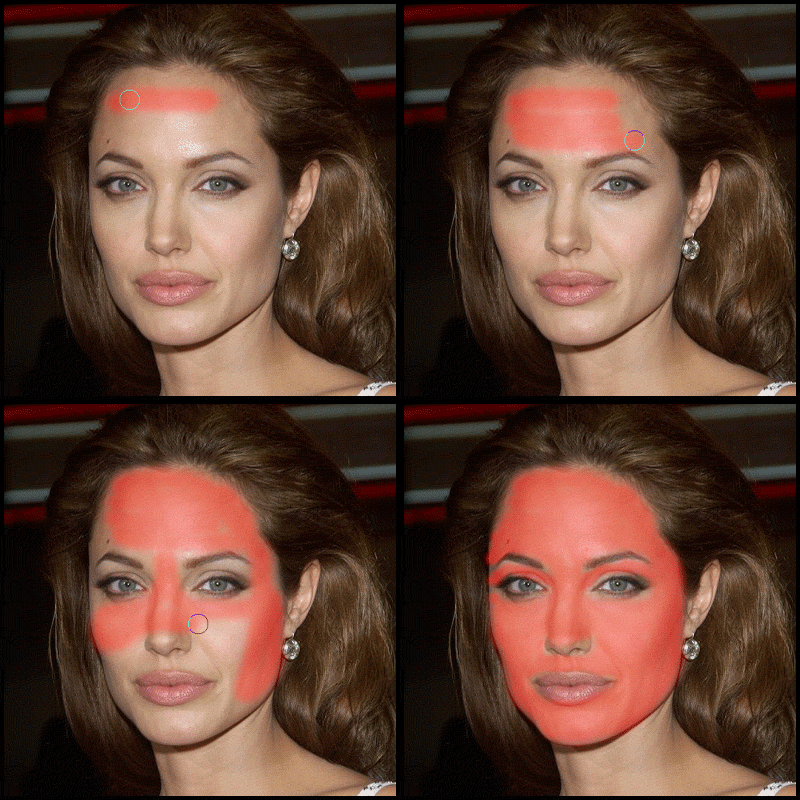
Tip: If you accidentally paint outside the area you want, press "X" (switches colors), then just go over the area you want to erase, then press "X" again to go back to painting your selection.
Now that you have selected your area in quick mask mode, exit the quick mask mode by pressing "Q" or clicking on the "Standard Mode" button (Next to the Edit in Quick Mask Mode button)
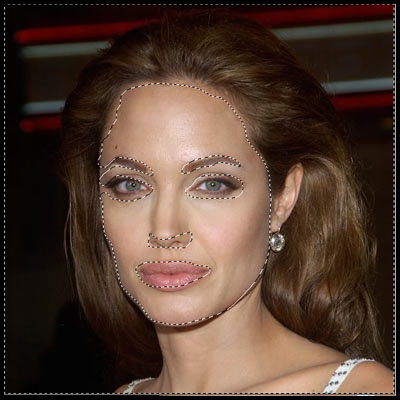
Now you should have a selection, around the face.
Now, go to Select->Inverse, then Select->Feather, and enter about 10px.
Tip: You can hide the "Marching Ants" lines so you can have a better view of the image by pressing "CTRL+H"
Now go to Filter->Blur->Guassian Blur. Set radius to about 3 pixels.

That is looking too smooth, which make it look rather unrealistic, so lets put some texture back into the skin. Go to Filter->Noise->Add Noise. For amount, put about 2.5%, Uniformed and Monochromatic selected.
That's it. Here are the original and edited version side by side.


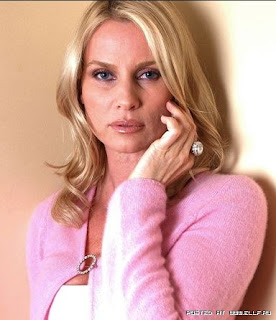
I see a million of these simple tricks executed in print when I'm waiting in line at the grocery store staring at dozens of magazines, all fake faces and fake bodies, all displaying totally false versions of the actresses on the covers. Here's another sample of Nicollette Sheridan, Before and After:

So have fun doing this to your own photos, it's a quick and easy way to make yourself look younger!
Tutorial found at: http://www.tutorialwiz.com/smooth_skin/

To start off, lets open up the picture you want to edit. I'm working from an Angelina Jolie photo of course.
First, we need to duplicate the layer, so lets go ahead and right click on the layer in the layers palette and select "Duplicate Layer".

Now we need to select the area we want to smooth out, in this case, we want to smooth out the face, but we want to leave the eyes, nose and mouth intact so it looks genuine. So start by switching to the quick mask mode by clicking on the "Edit in Quick Mask Mode" button in the tool box.
Then select the Brush Tool, and set the brush size to 35 soft edge. (brush size will depend on your image).
Press "D" to reset your colors. Now use your brush and paint over the face, the painted area will become your selected area. The painted area will be red as you can see below. Continue and paint around her face until its covered like mine. You may need to change your brush size to a smaller size to cover the tighter areas.

Tip: If you accidentally paint outside the area you want, press "X" (switches colors), then just go over the area you want to erase, then press "X" again to go back to painting your selection.
Now that you have selected your area in quick mask mode, exit the quick mask mode by pressing "Q" or clicking on the "Standard Mode" button (Next to the Edit in Quick Mask Mode button)

Now you should have a selection, around the face.
Now, go to Select->Inverse, then Select->Feather, and enter about 10px.
Tip: You can hide the "Marching Ants" lines so you can have a better view of the image by pressing "CTRL+H"
Now go to Filter->Blur->Guassian Blur. Set radius to about 3 pixels.

That is looking too smooth, which make it look rather unrealistic, so lets put some texture back into the skin. Go to Filter->Noise->Add Noise. For amount, put about 2.5%, Uniformed and Monochromatic selected.
That's it. Here are the original and edited version side by side.


I see a million of these simple tricks executed in print when I'm waiting in line at the grocery store staring at dozens of magazines, all fake faces and fake bodies, all displaying totally false versions of the actresses on the covers. Here's another sample of Nicollette Sheridan, Before and After:


So have fun doing this to your own photos, it's a quick and easy way to make yourself look younger!
Tutorial found at: http://www.tutorialwiz.com/smooth_skin/
Subscribe to:
Posts (Atom)